Showing posts with label FOSS. Show all posts

February 2, 2010

World is no more closed !

Most of the people confuse Open Source movement as something confined to the software and related areas, but in reality Open Source is not only the making of a license free software world, it's beyond that. Let's see how Open Source ideas are taken into fields other than computing and software.There are several Projects and Communities motivated by the Open Source ideology. Like Open Source Hardware and BlinkenLights Project. These things shows us how Open Source technologies can better the life experience in much better and creative ways. Yeah the world is no more closed to creative ideas. Express yourself with Open Source Technologies.

BlinkenLights

BlinkenLights Project is one of the best examples for how crazy and creative Open Source ideas can be, and how it can change the way the world works.
On September 11th, 2001 the famous "Haus des Lehrers" (house of the teacher) building at Berlin Alexanderplatz has been enhanced to become world's biggest interactive computer display: Blinkenlights.


The upper eight floors of the building were transformed in to a huge display by arranging 144 lamps behind the building's front windows. A computer controlled each of the lamps independently to produce a monochrome matrix of 18 times 8 pixels. There was an interactive component, which enabled users to play old arcade classic Pong using the mobiles or placing love letters or animations on the Screen.Even a software called BlinkenPaint was created and made available as Free software which enabled users to create their own animations.

Free Beer (I'm not kidding!)

The project Free Beer, originally conceived by Copenhagen-based artist collective Superflex and students at the Copenhagen IT University, applies modern free software / open source methods to a traditional real-world product - namely the alcoholic beverage loved and enjoyed globally, and commonly known as beer.


The recipe and branding elements of FREE BEER is published under a Creative Commons (Attribution-ShareAlike 2.5) license, which means that anyone can use the recipe to brew their own FREE BEER or create a derivative of the recipe. Anyone is free to earn money from FREE BEER but they must publish the recipe under the same license.


RadioVeRVe

RadioVeRVe is an internet radio station operating out of Bangalore, India. It differentiates itself from other FM and internet radio stations by focusing exclusively on independent music from India.


Even though It's not an open Source project. The infrastructure for the radio station has been completely based on open source software.

Open source hardware


Open source hardware/Open source Electronics refers to computer and electronic hardware that is designed in the same fashion as free and open-source software.


Open source hardware is part of the open source culture that takes the open source ideas to fields other than software. An example of this is the Simputer project.

XKCD - A webcomic of romance,sarcasm, math, and language.

XKCD, a geek humor comic created by Randall Munroe a former contractor for Nasa. XKCD is Licensed under a Creative Commons Attribution-NonCommercial 2.5 License . This means it's free to copy and share these comics


There are so many such open projects, that are currently involved in changing the world from the way it worked. May be you will be the one behind next major project :). Happy Open Sourcing.

August 18, 2009

Web Content Management Systems

Content management systems are more popular these days, even those with little knowledge about Internet & Web making can create fully-fledged websites with the help of content management systems. This article intends to introduce some of the pioneer Open Source web content management systems.

Wikipedia defines Web CMS systems as follows.
web-content-management system (WCMS or Web CMS) is content management system (CMS) software, usually implemented as a Web application, for creating and managing HTML content. It is used to manage and control a large, dynamic collection of Web material (HTML documents and their associated images). A WCMS facilitates content creation, content control, editing, and many essential Web maintenance functions.
There are a lot of popular Content Management Systems available, many of them are free and open source. Content management systems like Wordpress, Django, Drupal, etc are a few best options among them. Let's see some of them.

Drupal

Drupal is one of the most popular Open Source Content management Systems, it is equipped with a powerful blend of features, Drupal supports a variety of websites ranging from personal weblogs to large community-driven websites. Drupal is developed using PHP, the standard release of Drupal (Drupal core), contains basic features common to most CMSs. These include the ability to create a classic brouchureware website or a community oriented interactive website.It also boasts of a variety of features and plugins. One of the main advantage of using Drupal is its community support, Drupal has a strong community driven by developers, contributers, users, fans, etc.

You can downlaod Drupal from http://drupal.org/

Wordpress

Wordpress is another popular Open Source Content manage system, it is the official successor of b2\cafelog which was developed by Michel Valdrighi. Even though wordpress is a complete content management system, it is most popular among its users for its powerful blogging capabilities and ease of use. Like most of the other popular CMSs it also features a rich plugin based architecture and theme support along with its legendary widget system. Since Wordpress is a community oriented open source software, you will have a great support from the community with each and everything from installation to customisation.

Learn more about Wordpress from http://wordpress.org/

Joomla

Another Top of the breed Content Management System. Like other content management systems, Joomla also boasts of a rich architecture with plug-in and theme support. The official site says that - "Joomla makes creating and maintaining Web sites easy for everyone, from total beginners setting up their first site to IT professionals managing enterprise installations." The Joomla has a strong community of developers, contributors and others willing to help anyone who is interested in Joomla.


You can Get your copy of Joomla and learn more about it from http://www.joomla.org/

TYPO3

It is an open-source, enterprise-level content management system focused on providing companies a solution for websites and their intranet. While most of the content management systems try to be simple and basic, TYPO3 comes with a set of complex and powerful features to help you achieve complicated tasks and ability to integrate with other applications. It is recommended for intermediate to advanced users.

Read more and download typo3 from http://typo3.com/

Railfrog

It is a user-friendly, open source website deployment and content management system, producing well structured and standards-compliant pages with Web 2.0 goodness. Railfrog makes it easy for developers, designers, webmasters, or just about anyone else to deploy and manage a website. One of the main features of Railfrog is it is developed on top of the Ruby on Rails web application framework (the same technology behind twitter and basecamp).

Download and Learn more from http://railfrog.com/

Open CMS

Open CMS is another open source CMS based on Java and XML technology. The fully browser based user interface features configurable editors for structured content. Alternatively, content can be created using an integrated wysiwyg editor similar to well known office applications. A sophisticated template-engine enforces a site-wide corporate layout and W3C standard compliance for all content. There are plenty of enterprise standard features in Open CMS, which makes it one of the perfect candidate for enterprise customers, the same time Open CMS keeps the simplicity to attract the ordinary customers too.

Get your copy of Open CMS from http://www.opencms.org

PostNuke

It is another Open Source Content management system, that helps us to creates an impressive, dynamic web site and provides the webmaster with a site they can administer with a minimal amount of HTML knowledge through a web browser. PostNuke's functionality can be increased by installing modules, blocks and themes. For example, you can add a forum, a gallery and contact form. You can also change how your entire site looks by changing themes. All of this can be done with just a few clicks in the administration panel saving you hours of time, both in the initial creation of the website and in its day to day maintenance.

You can read more information and download Post nuke from http://www.postnuke.com/

So now you know a few Free-to-use Content Management Systems, why not try and make a website or blog for yourself ?? Watch out for more useful articles :)

April 23, 2009

CVS : Concurrent Versions System

I started learning some courses using MIT Open CourseWare, some of the courses need to have softwares like Eclipse,CVS etc. Let's see how to install a CVS Server in your Ubuntu Machine.

Concurrent Versions System (CVS), is a free software revision control system. Version control system software keeps track of all work and all changes in a set of files, and allows several developers to collaborate.

Install and Configure CVS Server

You can install CVS files by typing sudo apt-get install cvs in your terminal.

Then we need to install the CVS server by entering sudo apt-get install cvsd in your terminal.


Type in “/cvsrepo” when the cvsd prompts to enter a Repository.
(make sure the directory "cvsrepo" exists, if not create a directory with the command sudo mkdir /cvsrepo)

Now change the directories permissions using the command sudo chown -R cvsd:cvsd /cvsrepo

once the installation is completed, goto /var/lib/cvsd by typing cd /var/lib/cvsd in your terminal.

You can use sudo cvsd-buildroot /var/lib/cvsd to create a cvs build root directory.

Now initialize the cvs repository using the command sudo cvs -d /var/lib/cvsd/cvsrepo init

Creating a CVS user Account


sudo cvsd-passwd /var/lib/cvsd/cvsrepo +username can be used to create a new cvs account.

NB replace username with your desired user name (for example John).

Test your CVS Repository

cvs -d :pserver:testusername@localhost:/cvsrepo login

cvs -d :pserver:testusername@localhost:/cvsrepo checkout

Now everything is set and your cvs server is ready to fly. Experiment with it.


April 10, 2009

Inkscape : An Open Source Vector Graphics editor

Inkscape is an Open Source vector graphics editor, with capabilities similar to Illustrator, CorelDraw, or Xara X, using the W3C standard Scalable Vector Graphics (SVG) file format.


Inkscape supports many advanced SVG features (markers, clones, alpha blending, etc.) and great care is taken in designing a streamlined interface. It is very easy to edit nodes, perform complex path operations, trace bitmaps and much more. We also aim to maintain a thriving user and developer community by using open, community-oriented development.


Features:

  • Object creation (pencil tool, pen tool, calligraphy tool rectangles, ellipses, stars/polygons, spirals, text tool, embedded bitmaps, clones)

  • Object manipulation (Affine transformations, Z-order operations, Grouping objects, Layers, Copying and pasting objects, Alignment and distribution commands)

  • Fill and stroke (Color selector, Color picker tool, Copy/paste style, A gradient editor capable of multi-stop gradients, Pattern fills, Dashed strokes, Path markers)

  • Operations on paths (Node editing, Converting to path, Boolean operations, Path simplification, Path insetting and outsetting, Bitmap tracing)

  • Text support (Multi-line text, Uses any installed outline fonts, including right-to-left scripts, Kerning, letter spacing, line spacing adjustments, Text on path, Text in shape)

  • Rendering(Fully anti-aliased display, Alpha transparency support for display and PNG export, Complete "as you drag" rendering)

  • Miscellaneous (Live watching and editing the document tree in the XML editor, Command line options for export and conversionsm, Perfectly compliant SVG format file generation and editing)
You can get your copy of Inkscape from the Inkscape download page.

http://www.inkscape.org/ is the official website of Inkscape. Checkout the site for more details and documentation on Inkscape

April 4, 2009

Arduino - Open source electronics prototyping platform

Exceptionally boring classes made me think about some alternatives, so that I can get myself engaged in something. And some how I ended up googling about electronics. Amazingly my fingers led me to Arduino - an Open Source electronics prototyping platform.

Arduino

Arduino is an open-source electronics prototyping platform based on flexible, easy-to-use hardware and software. It's intended for artists, designers, hobbyists, and anyone interested in creating interactive objects or environments.


Arduino can sense the environment by receiving input from a variety of sensors and can affect its surroundings by controlling lights, motors, and other actuators. The microcontroller on the board is programmed using the Arduino programming language (based on Wiring) and the Arduino development environment (based on Processing). Arduino projects can be stand-alone or they can communicate with software on running on a computer (e.g. Flash, Processing, MaxMSP).

Why Arduino ?

Some of my friends are working on some electronics projects and all the time when something goes wrong they have to replace some parts or remake it again. But the open source nature of Arduino initiated projects like Fritzing, which made the job of enthusiasts much less and interesting. Anyone with common sense can understand how these stuff works and can get started in a few hours or days. The strong community support is always available whenever we are in the middle of trouble.

What is Fritzing ?

Fritzing is essentially an Electronic Design Automation software with a low entry barrier, suited for the needs of designers and artists. It uses the metaphor of the breadboard, so that it is easy to transfer your hardware sketch to the software. From there it is possible to create PCB layouts for turning it into a robust PCB yourself or by help of a manufacturer.

I'm interested. But..Where Should I start ?

The getting started section of Arduino site is complete with instructions to install and documentations to help you on the go. You can access the page here - http://arduino.cc/en/Guide/

The Arduino forum is another place where you can actively discuss your problems, doubts and suggestions. Everyone out there are so helpful and cooperative. Check out - http://www.arduino.cc/cgi-bin/yabb2/

You can also checkout http://fritzing.org/learning/ for learning more about Fritzing project.

March 11, 2009

Science Commons

I have been talking about the Open Source Science Movement in a previous post, but I missed an important movement - Science Commons, it is a Creative Commons project for designing strategies and tools for faster and more efficient web-enabled scientific research.

Science Commons was launched with the goal of bringing the openness and sharing that have made Creative Commons licenses a success in the arts and cultural fields to the world of science. Science commons was housed at the Massachusetts Institute of Technology, the movement started in the year 2005.


Science Commons has three interlocking initiatives designed to accelerate the research cycle — the continuous production and reuse of knowledge that is at the heart of the scientific method.


Making scientific research “re-useful” — We help people and organizations open and mark their research and data for reuse. Learn more.

Enabling “one-click” access to research materials — We help streamline the materials-transfer process so researchers can easily replicate, verify and extend research. Learn more.

Integrating fragmented information sources — We help researchers find, analyze and use data from disparate sources by marking and integrating the information with a common, computer-readable language. Learn more.

Science Commons Projects

Science Commons is currently working on three areas to clear legal and technical barriers to research.

In each project Science Commons follows the open source standards and approaches.

http://sciencecommons.org/ is the official website of Science Commons.

NB : Information and data courtesy Wikipedia & Science Commons.

March 10, 2009

Open Source Robotics

Even after better hardwares are available, there was a serious problem in the availability of software toolkits for robot developers. Now the Open Source movement offers a helping hand with its Open Source Hardware and Open Source Robotic movements. Building a Robot involves different skill sets including firmware design, hardware design, mechanical design etc. But Open Source Robotics toolkits and simulation environments can provide a virtual environment for building, testing and visualizing robotics algorithms with low cost of development.It was never this easy to play with hardware, with the help of a new generation of open source hardware platforms and rapid fabrication tools.

"We are starting to realize we can control a laser cutter like a printer," said Pablos Holman, a long time figure in the hardware hacking movement.

Open Source Robotics is slowly getting popular and now hackers are slowly embracing the Open Source Robotics. See some of the most popular open source robotic movements.


The Leaf Project is a group robot development program. The objective is to develop a robot platform that supports experiments with Artificial Intelligence, vision, navigation etc.

Simbad is a Java 3d robot simulator for scientific and educational purposes. It's mainly dedicated to researchers and programmers who wish to study Artificial Intelligence, Machine Learning and more generally AI algorithms, in context of autonomous robotics and agents.

Simbad also enables programmers to write their own robot controller programs, or modify th environment and use the available sensors.It's available under GPL license.

RobotFlow is a mobile robotics tookit based on the FlowDesigner project. FlowDesigner is a data-flow oriented architecture, similar to Simulink (Matlab) or Labview that is free (LGPL) and versatile. The visual programming interface provided in the FlowDesigner project will help people to better visualize & understand what is really happening in the robot's control loops, sensors, actuators, by using graphical probes and debugging in real-time.

Robot Operating System, ROS is a new, ultra-portable robot programming system. ROS lets you easily build distributed robot control systems in different languages and on different platforms.

If you ever dreamed about a robotic world designed by you, now the time is yours. Start design and create your own robots. Be the future robotic guru with the open source technologies. Yeah it's free, free as in free speech not as in free beer.

NB: image courtesy wired.com

March 8, 2009

Open Source Science

Science is for the good of society, the scientists must work together for the progress and prosperity of the world, but unfortunately the competition for intellectual property protection and for other reasons that is not happening in the real world. Sharing the ideas and Opening Scientific problems to a community of Experts will only help the problem or experiment to be solved or improved in one way or other.

I recently had a talk about this situation with one of my friend (1 degree of separation), he is working as a Biotechnology Scientist. So I told my opinion about the situation and He replied that the idea seems good, but he's not much sure if it will work or not. He also added that it will help students a lot.When I came back home, I Googled to know if there is any Open Source technologies available for that. To my surprise I stumbled on a site - OpenSourceScience.net

Open Source Science

Open Source model can help increased participation, rapid and innovative results. And the best thing is that unlike the normal research scenarios even laypeople can contribute to the design.

There are also certain amount of danger involved in making experiments Open Source,the possibility of Open Source Experiments used by unwanted people for dangerous purposes.

OpenSourceScience.net is a main Open Source Science initiative.The site says that it is a public space for managing controversial scientific experiments in a way that provides open access to all phases of the research. The site also provide a centralized resource for scientific collaboration, and help underwrite scientifically rigorous experiments that may contribute to an improved understanding of consciousness.

It seems like Open Source ideology is moving beyond it's normal scope. Let's all hope for a better world of free thinkers and Open Minded [:)] people.

March 7, 2009

OpenRep : Open Source Homeopathic Repertorization software

One of my friend is a Homeopathic Doctor. One day after talking a while he asked me if I can help him switch to Linux, so that he don't need to worry about the viruses anymore. Then as usual I introduced him the basic Migration strategies. Then he realized that the homeopathic software he uses is one of the most important software he need and it will not work under Linux. He told me if I can help him to complete Migration successfully. I started searching for an alternative for the software and finally found OpenRep, a free and open source Homeopathic software.

What is OpenRep ?

It's the first truly free and open source Homeopathic repertorization software. It supports working with multiple repertories, adding new repertories and repertorize by using multiple repertory results at once.The project is still in its early phase of development.


Features
  • Browsing the tree structure of repertory
  • Repertory search using the special search system to enable the easiest and most advanced textual search
  • Automatic repertorization whenever a new symptom is added or a symptom is deleted
  • Saving repertorization to a human readable xml file
  • Importing multiple repertories
  • Displaying detailed repertorization results in a graphical format
  • Editing any imported repertory and submitting changes to contribute to the Repertorium Publicum project
  • Patient Management System
Will it work in My Computer ?

Yes OpenRep works under almost all majour operating systems including Linux Windows and Mac OS X, Solaris
How can I install it in my Machine ?

You don't need to be a computer geek or nerd to install this software, it's pretty much simple.
  • Unpack the installation .zip file into any folder
  • Install JRE (Java Runtime Environment)
  • Execute the OpenRep.jar file
Links and Downloads
NB : If you have any troubles regarding installation or anything just post a comment here, or drop a mail to my inbox at nextdoornerd AT gmail DOT com

March 3, 2009

Assistive Technologies

I had a few experience with People with disabilities such as blindness, deafness, etc. I've also participated in some activities where such people were trained to be an independent person. And what I felt was after those sessions they were all happy, because they felt like they are capable of something and it made them happier and more independent than they were before. This was all before a few years and now was wondering if I could do something for the benefit of them. So I decided to write a series of blog posts on Open Source assistive Technologies, Starting with this post.

What is Assistive Technology ?

Wikipedia, one of the most popular web encyclopedia defines assistive technologies as a generic term that includes assistive, adaptive, and rehabilitative devices for people with disabilities and includes the process used in selecting, locating, and using them.

Why Assistive Technologies ?

I'm sure that this question is irrelevant in this educated modern era of compassionate people. However There are a lot of people with disabilities (say millions of them). Who need our support and care, but in the case of technologies, they are often created without regard to people with disabilities. And this makes it harder for them to use these technologies as the normal people do. I believe that It's our Dharma to take care of them and help them overcome their difficulties. I belive that Open Source not only the making of free and Open Source Software, it is more about creating a better world, A world where everyone gets a chance to live a better life without any restrictions.

How Can I Help the Disabled ?

There are somany was you can think of. You can contribute to some Open Source Assistive Technology projects if you can. Or you can create a local group to help people with disabilities, such as helping them to learn Braille. Even you can learn how to configure assistive softwares so that you can help some people with that. Or you can do something else that you think will eventually help the disabled people.

Devising Futuristic Ideas for Assistive Technologies is a good way of contributing.Everyone is talking about Virtual Reality and Augmented Reality, and there are even some Open Source Projects related to these things are getting ready. So why can't you tap your creative thinking to innovate new ideas for the future ?, which can help disabled people interact with virtual and augmented environments much easily.


What are the available Open Source Assistive Technologies ?

There are a number of Ope Source Projects that focus on creating assistive technologies for the disabled people.

  • Dasher is a computer accessibility tool which enables users to write without using a keyboard
  • http://www.nvda-project.org/ - NonVisual Desktop Access (NVDA) is a free and open source screen reader for the Microsoft Windows operating system

I'll update the blog soon with a few other posts, where we'll be discussing, how to setup your Linux Box for disabled people with open source assistive technologies.

February 6, 2009

Basic Migration Strategies

Most people are cautious about making major infrastructure changes, especially when it is a business infrastructure. Infrastructure migration includes changes in the computer networks and software setups,etc. Migrating to open source software might seem hard at first,but there are ways with which you can introduce Open Source Software into your business without risk. Here are a few guidelines for the migration to the Open Source Software.


Decision dilemma

The most important thing to consider while thinking about a Migration is how important is the migration is and how it is going to change your business ?. It's better to decide whether you want to make a switch or not. Before making a decision ask yourself these questions.

  • Is the client's employee population strictly dependent on a third-party application, plug-in, or devices that are only supported on proprietary platforms such as windows?

  • Has the client intensively developed custom applications based on native
    Win32 APIs and programming environments, such as Visual Basic® or
    other Windows scripting languages?

  • Is the client's entire employee population dependent on advanced Microsoft Office-based functions (for example, dependencies on complex macros)?
If the answer is yes to any of these questions, then the open source solution might be a less-suitable alternative. However if your decision is to move on with the migration you can do it, but it will require a more complex strategy that will require a careful consideration.

If the answer is no then you can proceed to the migration to open source software without any doubt.

NB : source of the questions - Linux Client Migration Cook Book v2

Slow and steady wins the race!

You can start the migration with simple changes, there will be a few services that can be replaced initially without much changes in the existing infrastructure. For instance you can add programs like Open Office, Firefox and Thunderbird without removing MS Office, Internet Explorer and MS Outlook in your desktop machines, this will help your employees test drive and learn open source software. It's also good if you can try a dual boot option where you can tryout Linux distributions while still running windows.

The easiest way to determine whether open source software is right for business, is to run it along with your normal programs.This has an added advantage, even if you experience errors and trouble learning to use new software, it won't interrupt your normal business.

Moving to Linux Distributions

Once you decided to use open source software on a daily basis, and you are used to it. Then you can start thinking about the operating system migration. It may sound difficult, but most Linux distributions can be installed without any hurdles.You can either dual boot your system with windows and Linux by installing Linux in a hard drive partition without affecting windows or you can tryout the Linux using some Live Linux CD.

Try some Live Linux Distributions

If you are still afraid of changing the operating system, then you can try some Live Linux distributions - Live distributions can run an operating system from a CD or DVD- to get familiar with Linux operating systems. The advantage of using Live distributions is that you can try the operating system without making any change in your computer.

Ubuntu is an easy to use Linux Distribution. You can either download your copy of operating system or you can order a free CD of Ubuntu from their site.There are a number of Live distributions available, like SUSE,Knoppix,etc..

Take some time to getting used to the new operating system, since they have a little different look and feel.

Large scale Migration

Once you are familiar with the open source operating system and software and if you are planning for a major infrastructure change to open source technologies, then you might consult any local open source consultants, They may be able to assist you in the migration process by helping you choose the best solutions and strategies needed to establish the new infrastructure to flourish your business.

Enterprise Enlightenment!

Computers and ITES (Information Communication Technology Enabled Services) are essential for every enterprise, no matter how big or small it is. Few years ago the only choice for IT infrastructure was to either run legitimate versions of proprietary software or use the pirated versions. But now Linux and other open source software are slowly dominating the business world, with their low cost high quality products. A recent survey revealed more than 50% of the web servers are using open source solutions such as Apache and MySql.

How Open Source Works ?


Open Source Softwares are softwares maintained by community developers (millions of them spread across the globe) rather than by a company, the source code of the Software will be openly shared, so that any one who is interested can develop, customize or enhance the software.

Read the Open Source Definition


Why Open Source ?


Open Source applications are evolved into powerful and quality products that can run on already existing hardware.

Other features include :

  • Low Requirements - open source applications require low memory and processing power (exceptions prevail) than the alternative applications need to provide similar performance.

  • Customizable - they are highly customizable. So that the user can create custom softwares based on the open source software to keep up with his standards or requirements.

  • Stability - compared to other proprietary alternatives, open source technologies are stable and less error-prone.

  • Secure - open source softwares are secure compared to its proprietary competitors.

  • Support - with strong online communities and forums, open source technologies are naturally the best supported software.

  • Low Cost - open source technologies helps us to setup infrastructures for almost free of cost.


How Open Source can help Business ?

As the recession put pressure on companies who are spending money on software infrastructures, which needs to be replaced soon within a few years time. This is where the freely available, high quality open source solutions lends a helping hand.There is a rich number of open source applications are available today for Web Servers, Databases, Content Management, Security, Development tools, etc. Open Source also helps to reduce maintenance cost and upgrading charges.Usually the softwares will be replaced or upgraded in recent years in almost all software infrastructures.


  • If you are planning any software purchase, you might check if there is any open source alternative available.In most of the cases Proprietary companies provide limited functionality software for low cost and later when you realize that you need more functionalities, you need to pay more for it. If there is an open source alternative is available, it will be almost free of charge, even if the software is a subscription based one it will cost only very less compared to the proprietary alternative.

  • If you are looking at operating costs, open source offers the least expensive computing environment for small business. In such cases open source also offers more scalability and efficiency at low setup and maintenance cost.

  • Open Source solutions can also help organizations to develop custom applications based on the existing Open Source applications. This provides more flexibility for organizations.

  • Companies can reduce licensing fee required to pay for the proprietary technologies. Most likely these technologies will be replaced with newer versions in short period of times, which requires purchase of license again.
There are a million ways open source technologies can help your business grow, we'll discuss some of them in this blog later.

Subscription based Open Source Softwares

There are subscription based Open Source Softwares, usually they are of very low rate compared to it's proprietary competitors. Red Hat is one of the biggest commercial open source company with revenue exceeding $500 million.

Difficulties in using Open Source Software

However, working with open source software comes with a lot more hardships than working with proprietary software. Companies that aren't working with commercial open source vendors or consultants will have to face a lot of hurdles on the way than they may be used to. But still there are lots of communities local and global available to help people who makes use of open source software, so no need to worry.

Read More Success stories


Keep coming back to this blog. I'll update it with some how-to articles and other articles to help you in your transformation to Open Source Technologies.

December 26, 2008

Developer Manpages in Ubuntu

Manpages are very important for developers. Ubuntu doesn't come with Developer manpages pre-installed. So here is the simple way to install them in your machine. Happy Coding!

How to install Developer Manpages ?

  • Open Your Terminal and type sudo apt-get install manpages-dev .Make sure that you have an active Internet Connection.

Visit http://manpages.ubuntu.com/ to browse manpages online

November 7, 2008

DosBox : An MS-DOS Simulator for Linux

Wish to play your old M$-DOS games again ? You can use DOSBox to run your favorite vintage DOS programs in your Linux Machine.

DOSBox

DOSBox is a free sotware which simulates MS-DOS. It is intended especially for use with old computer games and programs.DOSBox does not rely on any Virtualization techniques it is a full CPU emulator, capable of running DOS programs that require the CPU to be in either real mode or protected mode.


Features of DOSBox

  • DOSBox is even capable of emulating many types of audio and graphics hardware. Graphics emulation includes text mode, Hercules, CGA , Tandy, EGA, VGA, etc. Sound hardware that can be emulated includes the PC speaker, AdLib, Gravis Ultrasound,etc.

  • Another advantage is, DOSBox can simulate peer to peer networking, this includes modem simulation over TCP/IP

  • It's very simple and easy to use.
click here to read more

How to install DOSBox in Ubuntu

  • Typing sudo apt-get install dosbox in your terminal will fetch you the dependency libraries and install DOSBox in a few moments.When the installation is completed you can type-in dosbox in your terminal to acces DOSBox.

External Links

NB: If you are looking for a more advanced windows software emulator where you can play your 3D games and other Softwares, you might probably give a look at Wine.

Amarok : Best Music Player for Linux

Computer is not just a Hacker-Box any more, it's revolutionizing our world with its entertainment capabilities. Let's make this more easier with Open Source.

Amarok !

Amarok is the music player for Linux and Unix with an intuitive interface.We all know how hard it is to maintain a good music collection, however Amarok makes organizing your music easier than ever.


Features of Amarok

Amarok is not just like any other music player available, it's more than a simple music player.It can be used to organize a music library into folders according to the information such as artist,genre and album, it can be used to manage music tags, album art,etc

  • Amarok can help you in associating Album art (Cover art) with a particular album, and retrieving the cover art from Amazon

  • Creating and organizing playlists are more easier with Amarok it even supports dynamic playlists.

  • Synchronizing, retrieving, playing, or uploading music to the following digital music players like iPod.

  • Displaying artist information from Wikipedia and retrieving song lyrics.

  • Last.fm support, including submitting played tracks (including those played on some digital music players) to Last.fm, retrieving similar artists, and playing Last.fm streams.

  • You can even manage and listen to your favorite Podcasts using Amarok.

  • The integration of Magnatune, a non-DRM digital music store, enabling users to purchase music in Ogg, FLAC, WAV and MP3 formats.

Disadvantages

  • If you have own a collection of DRM protected Music, You must be disappointed.

How to install Amarok in Ubuntu ?
  • Just type-in sudo apt-get install Amarok in your terminal.

Important Links

October 28, 2008

VirtualBox : Fix "Spawning Session" problem

After installing some Ubuntu updates, I noticed that I couldn't start any Virtual Machine in Virtual Box.It shows a “spawning session” dialog which stuck at 0% forever.


Solution for the problem

If you can't close or terminate your VirtualBox program which is stuck with the 'Spawning Session' problem, just open the terminal and force kill the VirtualBox
  • type sudo killall VirtualBox in the terminal
Now you need to recompile the kernel module for VirtualBox, It's not that hard
  • just type sudo /etc/init.d/vboxdrv setup to recompile the kernel module and wait for a few seconds
You will get an output like the following
  • * Stopping VirtualBox kernel module * done.
  • * Removing old VirtualBox kernel module * done.
  • * Recompiling VirtualBox kernel module * done.
  • * Starting VirtualBox kernel module * done.
Now you can start playing with your virtual machines.

October 25, 2008

Elisa : Turn your Linux Box into a Media Center

Jealous with that Jaw-dropping Front Row or Windows Media Center ? Checkout Elisa, an open source cross-platform media center with simple looks and stable performance.


The Elisa Media Center boasts of many advanced features that will help you turn your Linux Box into a Media Center. Everything is packed in a simple interface with a professional look and feel.

Features

Movies - Watch your Video files and Movies, you can even watch your favorite videos from youtube and other sites.


Music - Listen to your Favorite Songs and organize your music collection by artists or album covers.


Photos - Entertain your friends with your animated slideshows and image previews.


Peripheral Devices - Let it be an iPod,External Hard Disk or a Digital Camera, Elisa Automatically detects them all.


Internet - Let it be Youtube, Flicker or other popular sites. You can have all of them at your fingertips.


Click here for a more detailed list of features.


Installing Elisa in Ubuntu

  • Installation of Elisa in Ubuntu and its Variants (Xubuntu,Kubuntu) are as simple as plucking a flower, just type sudo apt-get install elisa in the terminal.

Configure Your Media Directories
  • If your music and movies are already in the music folder and movies folder in the home directory, you need need not worry about this step.
  • Most probably you will have your music and movies located in another drive, in that case you can simply create a symbolic link.
  • consider you have all your music located in /home/user/Desktop/Test/ all you have to do is just create a shortcut of that directory and place it in the music folder. You can either use ln -s (from terminal) or Graphical User Interface for creating a link.

Pros and Cons
  • The Elisa is simple to install, configure and use.The interface is very good and clutter free.
  • There are a few problems occured occationally while playing video files, other than this there were no serious disadvantages.
Downlaod Elisa

Obtain your copy of Elisa from http://elisa.fluendo.com/


October 5, 2008

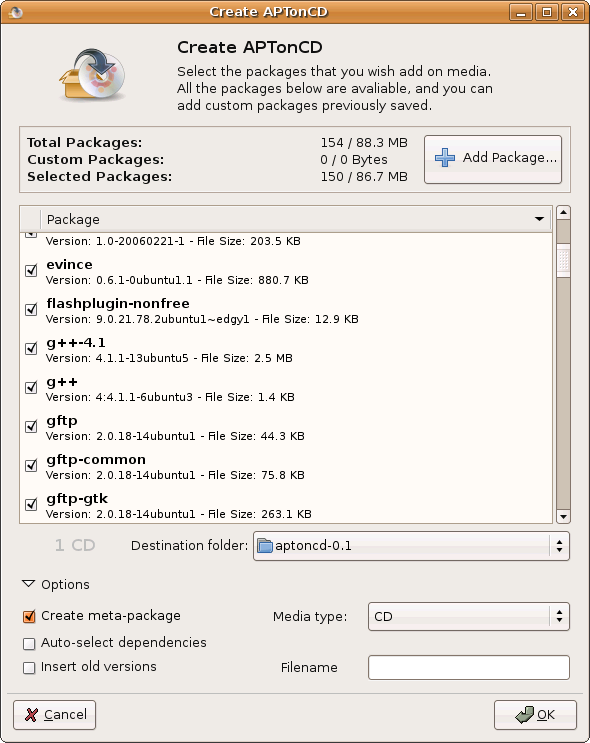
APTonCD : Create a Portable Package Repository

You've just finished installing Ubuntu and configured it with all your favorite applications, what if for some reason you now have to re-install it and don't know what packages you need to install.

This is hard, right ? Just checkout this cool application
APTonCD.

What is APTonCD

APTonCD is a simple Graphical Interface tool which enables you to create DVDs or CDs with all the packages you have downloaded using apt-get or Aptitude.It can also be used to create disks with all your pakages located in a specific repository. You don't need internet connection anymore when you have to re-install everything.


Features
  • Backup - Backup all the packages downloaded via aptitude, apt-get and synaptic.

  • Transport - You can carry all your favorite packages with you and install them anytime anywhere without worrying about an internet connection.

  • Download - You can downlaod and Backup an entire repository or a specific section to a CD or DVD.

  • Share - Share your favorite applications and packages with your friends.

External Links

Official site of APTonCD is http://aptoncd.sourceforge.net/

You can obtain your copy of APTonCD from the download page.


September 19, 2008

Ubuntu : Install Windows Applications with Wine!

Is it possible to install Windows applications in Linux ? this is the question often people ask me when I suggest to use Linux instead of windows. So I decided to write a how-to on installing windows software in Linux.

What is Wine ?

Wine is a FOSS software which aims to allow Unix-Like computer operating systems to install and execute programs written for Microsoft windows.


How to install Wine in my Ubuntu Machine ?

  • sudo apt-get install winewill install the wine from internet Repositories, when the installation is successfully completed a menu item will be placed in the applications menu in the top panel.
Using Wine to install Programs

  • Go to Applications ->Wine -> Configure Wine


Click on the Configure Wine Options shown in the menu. A new configuration window will prompt you to configure wine.There are two ways to open a windows application using wine.

  • The first is to select the Applications Tab on the configure Wine box and click on the Add Application Button, Locate your .exe file and add it.For this example I tried putty.exe (click to obtain your copy!).
  • The second way is the simplest,Just double click on the .exe file that you wanted install in your Linux (the problem with this is, sometimes this methode may not work).


Now it's time to play with your programs! Wine creates a folder called .wine in your home directory, you can access your virtual c drive there.
Opening Applications From terminal

  • open your terminal and type cd ~/ to enter your home directory
  • now type cd .wine/drive_c/ and press return to enter your virtual c drive
  • list the files using ls command and you will find Program Files Directory there.Just browse through and find your program and wine it (just type wine program_name.exe).


Opening Applications Directly
  • Just double click on the application that you want to open, and the wine will open it for you.
Okey now it's time to switch to Linux, Stop using windows ... :)

Ubuntu : Installing Flash player

Flash player is one of the most important plugin that every Netizen needs for his everyday life. So Here is how to install a flash player in Ubuntu.


Installing Flash Player

There are several ways to install flash support in Ubuntu, here we are discussing two relatively easy methods

  • This is the easiest way to install flash player in Ubuntu, Just type in sudo apt-get install flashplugin-nonfree ,this will fetch and install the plugin from internet (this works only if you have an active internet connection).
If you don't have an internet connection, you may need to install flashplayer plugin manually.

  • Go to http://www.adobe.com and download the Adobe flashplayer (the tar.gz download,remember do it all from linux, otherwise you will be redirecte to windows ).In this example we consider the file is downloaded to ~/Desktop (~/ represents the user's directory in linux)

  • change directory to ~/Desktop

  • tar xvfz install_flash_player_9_linux.tar.gz command will untar the tar file and change directory cd install_flash_player_9_linux/

  • sudo ./flashplayer-installer will invoke the installer and you will be asked a few questions.Answer the questions appropreately an the installation will be completed succesfully

NB: if the installer is aking for the installation path of mozilla then just enter /usr/lib/mozilla

This is all.Now you are ready to rock with youtube and metacafe!