Distributions (often referred as distro) are different Linux flavors designed for specific purposes. Like Ubuntu is designed to be very easy to use, BackTrack is used for security checking (Penetration Testing), Fedora for power users, JeOS (a distro based on Ubuntu) for virtual appliances, Gentoo for customization freaks and for those who want maximum performance, etc. There are 1000+ number of distributions available. But we will be focusing more on Ubuntu, since it is very user friendly and easy to use.
You can find a comparison of Linux distributions in Comparison_of_Linux_distributions - a wikipedia article.
Ubuntu
If you are looking for a Linux distribution to use with your PC, Laptop or Netbook or for home use, then Ubuntu is the best bet for you.Ubuntu is designed for usability and easiness.

Ubuntu is one of the most popular distributions available today, Ubuntu is designed for usability and ease of use. Ubuntu is based on Debian Linux Distribution. It has simple methods to install softwares, better look and feel, ease of use, etc. Ubuntu is not only intended for Home use. There are several distributions based on Ubuntu are available. Ubuntu Desktop Edition, Ubuntu Server Edition, Ubuntu JEOS, Ubuntu Studio are some of the official distributions.
visit http://www.ubuntu.com/ to learn more about Ubuntu
Fedora
Fedora is a general purpose operating system based on Redhat Package Management. It is sponsored by Red Hat. Though fedora is general purpose operating system, it is more suitable for power users.

Learn More about Fedora http://fedoraproject.org/
BackTrack
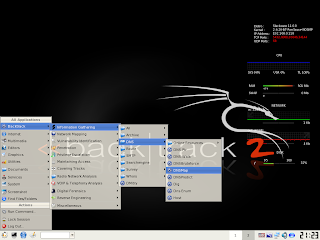
BackTrack is the most top rated Linux live distribution focused on penetration testing. It is an easy to use superior quality, optimized security penetration testing suit intended for security experts, analysts, hackers,etc.
Learn More about BackTrack : http://www.remote-exploit.org/
Gentoo Linux
Gentoo is built on top of the Linux Kernel and based on the Portage Package Management System. Gentoo is intended for advanced users, unlike a conventional software distribution, the user compiles the source code locally according to the chosen configuration. The distribution is designed to be modular, portable, easy to maintain, flexible and optimized for the user's machine.

Learn more about Gentoo : http://www.gentoo.org/

Live Distributions
A live CD or live DVD is a CD or DVD containing a bootable computer operating system. Live CDs are unique in that they have the ability to run a complete, modern operating system on a computer lacking mutable secondary storage, such as a hard disk drive. Live USB flash drives are similar to live CDs, but often have the added functionality of automatically and transparently writing changes back to their bootable medium. read more about Live Distributions from Live Disributions - Wikipedia Article
There are so many Linux distributions are available, you can read more about Linux distributions from Wikipedia - Linux_distribution and you can see a comparison list of Linux distributions in wikipedia, checkout Comparison_of_Linux_distributions .
We will be using Ubuntu for our tutorials, since this series of articles are intended for novice people.
Previous article : Switching to Linux : Part 1 [Introduction]
Stay tuned for next article : Switching to Linux : Part 3 [Installation]
You can find a comparison of Linux distributions in Comparison_of_Linux_distributions - a wikipedia article.
Ubuntu
If you are looking for a Linux distribution to use with your PC, Laptop or Netbook or for home use, then Ubuntu is the best bet for you.Ubuntu is designed for usability and easiness.

Ubuntu is one of the most popular distributions available today, Ubuntu is designed for usability and ease of use. Ubuntu is based on Debian Linux Distribution. It has simple methods to install softwares, better look and feel, ease of use, etc. Ubuntu is not only intended for Home use. There are several distributions based on Ubuntu are available. Ubuntu Desktop Edition, Ubuntu Server Edition, Ubuntu JEOS, Ubuntu Studio are some of the official distributions.
visit http://www.ubuntu.com/ to learn more about Ubuntu
Fedora
Fedora is a general purpose operating system based on Redhat Package Management. It is sponsored by Red Hat. Though fedora is general purpose operating system, it is more suitable for power users.

Learn More about Fedora http://fedoraproject.org/
BackTrack
BackTrack is the most top rated Linux live distribution focused on penetration testing. It is an easy to use superior quality, optimized security penetration testing suit intended for security experts, analysts, hackers,etc.

Learn More about BackTrack : http://www.remote-exploit.org/
Gentoo Linux
Gentoo is built on top of the Linux Kernel and based on the Portage Package Management System. Gentoo is intended for advanced users, unlike a conventional software distribution, the user compiles the source code locally according to the chosen configuration. The distribution is designed to be modular, portable, easy to maintain, flexible and optimized for the user's machine.

Learn more about Gentoo : http://www.gentoo.org/

Live Distributions
A live CD or live DVD is a CD or DVD containing a bootable computer operating system. Live CDs are unique in that they have the ability to run a complete, modern operating system on a computer lacking mutable secondary storage, such as a hard disk drive. Live USB flash drives are similar to live CDs, but often have the added functionality of automatically and transparently writing changes back to their bootable medium. read more about Live Distributions from Live Disributions - Wikipedia Article
There are so many Linux distributions are available, you can read more about Linux distributions from Wikipedia - Linux_distribution and you can see a comparison list of Linux distributions in wikipedia, checkout Comparison_of_Linux_distributions .
We will be using Ubuntu for our tutorials, since this series of articles are intended for novice people.
Previous article : Switching to Linux : Part 1 [Introduction]
Stay tuned for next article : Switching to Linux : Part 3 [Installation]

