Showing posts with label Kubuntu. Show all posts

November 7, 2008

DosBox : An MS-DOS Simulator for Linux

Wish to play your old M$-DOS games again ? You can use DOSBox to run your favorite vintage DOS programs in your Linux Machine.

DOSBox

DOSBox is a free sotware which simulates MS-DOS. It is intended especially for use with old computer games and programs.DOSBox does not rely on any Virtualization techniques it is a full CPU emulator, capable of running DOS programs that require the CPU to be in either real mode or protected mode.


Features of DOSBox

  • DOSBox is even capable of emulating many types of audio and graphics hardware. Graphics emulation includes text mode, Hercules, CGA , Tandy, EGA, VGA, etc. Sound hardware that can be emulated includes the PC speaker, AdLib, Gravis Ultrasound,etc.

  • Another advantage is, DOSBox can simulate peer to peer networking, this includes modem simulation over TCP/IP

  • It's very simple and easy to use.
click here to read more

How to install DOSBox in Ubuntu

  • Typing sudo apt-get install dosbox in your terminal will fetch you the dependency libraries and install DOSBox in a few moments.When the installation is completed you can type-in dosbox in your terminal to acces DOSBox.

External Links

NB: If you are looking for a more advanced windows software emulator where you can play your 3D games and other Softwares, you might probably give a look at Wine.

October 28, 2008

VirtualBox : Fix "Spawning Session" problem

After installing some Ubuntu updates, I noticed that I couldn't start any Virtual Machine in Virtual Box.It shows a “spawning session” dialog which stuck at 0% forever.


Solution for the problem

If you can't close or terminate your VirtualBox program which is stuck with the 'Spawning Session' problem, just open the terminal and force kill the VirtualBox
  • type sudo killall VirtualBox in the terminal
Now you need to recompile the kernel module for VirtualBox, It's not that hard
  • just type sudo /etc/init.d/vboxdrv setup to recompile the kernel module and wait for a few seconds
You will get an output like the following
  • * Stopping VirtualBox kernel module * done.
  • * Removing old VirtualBox kernel module * done.
  • * Recompiling VirtualBox kernel module * done.
  • * Starting VirtualBox kernel module * done.
Now you can start playing with your virtual machines.

October 25, 2008

Elisa : Turn your Linux Box into a Media Center

Jealous with that Jaw-dropping Front Row or Windows Media Center ? Checkout Elisa, an open source cross-platform media center with simple looks and stable performance.


The Elisa Media Center boasts of many advanced features that will help you turn your Linux Box into a Media Center. Everything is packed in a simple interface with a professional look and feel.

Features

Movies - Watch your Video files and Movies, you can even watch your favorite videos from youtube and other sites.


Music - Listen to your Favorite Songs and organize your music collection by artists or album covers.


Photos - Entertain your friends with your animated slideshows and image previews.


Peripheral Devices - Let it be an iPod,External Hard Disk or a Digital Camera, Elisa Automatically detects them all.


Internet - Let it be Youtube, Flicker or other popular sites. You can have all of them at your fingertips.


Click here for a more detailed list of features.


Installing Elisa in Ubuntu

  • Installation of Elisa in Ubuntu and its Variants (Xubuntu,Kubuntu) are as simple as plucking a flower, just type sudo apt-get install elisa in the terminal.

Configure Your Media Directories
  • If your music and movies are already in the music folder and movies folder in the home directory, you need need not worry about this step.
  • Most probably you will have your music and movies located in another drive, in that case you can simply create a symbolic link.
  • consider you have all your music located in /home/user/Desktop/Test/ all you have to do is just create a shortcut of that directory and place it in the music folder. You can either use ln -s (from terminal) or Graphical User Interface for creating a link.

Pros and Cons
  • The Elisa is simple to install, configure and use.The interface is very good and clutter free.
  • There are a few problems occured occationally while playing video files, other than this there were no serious disadvantages.
Downlaod Elisa

Obtain your copy of Elisa from http://elisa.fluendo.com/


October 5, 2008

APTonCD : Create a Portable Package Repository

You've just finished installing Ubuntu and configured it with all your favorite applications, what if for some reason you now have to re-install it and don't know what packages you need to install.

This is hard, right ? Just checkout this cool application
APTonCD.

What is APTonCD

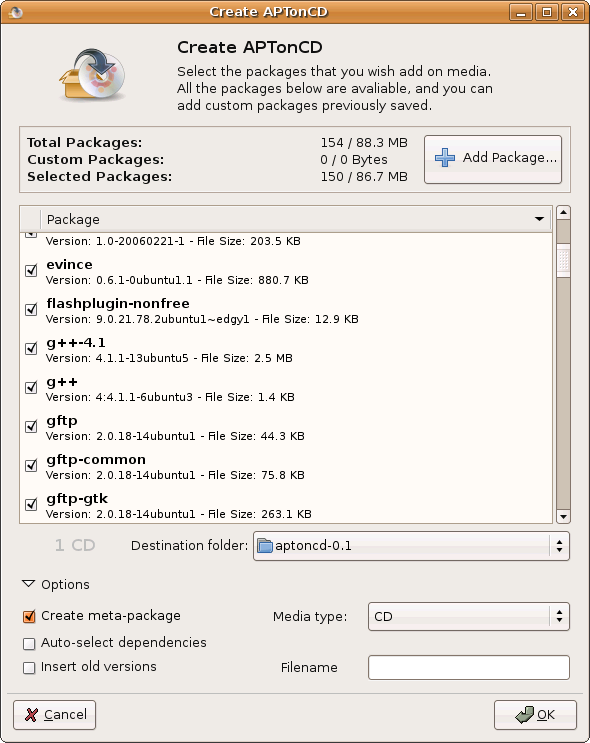
APTonCD is a simple Graphical Interface tool which enables you to create DVDs or CDs with all the packages you have downloaded using apt-get or Aptitude.It can also be used to create disks with all your pakages located in a specific repository. You don't need internet connection anymore when you have to re-install everything.


Features
  • Backup - Backup all the packages downloaded via aptitude, apt-get and synaptic.

  • Transport - You can carry all your favorite packages with you and install them anytime anywhere without worrying about an internet connection.

  • Download - You can downlaod and Backup an entire repository or a specific section to a CD or DVD.

  • Share - Share your favorite applications and packages with your friends.

External Links

Official site of APTonCD is http://aptoncd.sourceforge.net/

You can obtain your copy of APTonCD from the download page.